Hi,
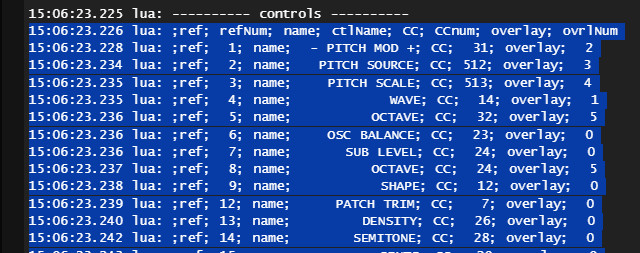
to avoid long search for “mysterious” behaviour of controls it could be helpful to have a list of their parameters. The following LUA code lists parameter ref number, name, CC and overlayID.
-- get reference numbers of controls and overlays
control_ref = {}
overlay_ref = {}
-- adjust your maximum ref number
maxrefnumber = 100
for i=1,maxrefnumber do
  if pcall(controls.get, i) then
    table.insert(control_ref, i)
  elseif pcall(overlays.get, i) then
    table.insert(overlay_ref, i)
  end
end
-- list control parameters: ref#, name, CC, overlay# (overlay# = 0 means no overlay !)
print("---------- controls ----------")
contname = {}
contCC = {}
contovl = {}
for i=1,#(control_ref) do
  cname = controls.get(control_ref[i]):getName()
  table.insert(contname, cname)
  cc = controls.get(control_ref[i]):getValue("value"):getMessage():getParameterNumber()
  table.insert(contCC, cc)
  ovl_Id = controls.get(control_ref[i]):getValues()[1]:getOverlayId()
  table.insert(contovl, ovl_Id)
  print(string.format("ref %2d, name: %14s, CC: %3d, overlay: %2d", control_ref[i], cname, cc, ovl_Id))
end
An example (Ableton Wavetable Oscillators):
13:07:21.503 ---- START ----
13:07:21.639 lua: ---------- controls ----------
13:07:21.639 lua: ref  1, name:          OSC 1, CC:   6, overlay:  0
13:07:21.639 lua: ref  7, name:       CATEGORY, CC:   1, overlay:  1
13:07:21.639 lua: ref  8, name:      WAVETABLE, CC:   2, overlay:  2
13:07:21.640 lua: ref  9, name:         EFFECT, CC:   7, overlay:  4
13:07:21.640 lua: ref 10, name:           FX 1, CC:   8, overlay:  0
13:07:21.640 lua: ref 11, name:           FX 2, CC:   9, overlay:  0
13:07:21.640 lua: ref 12, name:           SEMI, CC:  10, overlay:  5
13:07:21.640 lua: ref 13, name:         DETUNE, CC:  11, overlay:  6
13:07:21.641 lua: ref 14, name:            PAN, CC:   3, overlay:  3
13:07:21.641 lua: ref 15, name:           GAIN, CC:   4, overlay:  0
13:07:21.641 lua: ref 16, name:       POSITION, CC:   5, overlay:  0
13:07:21.641 lua: ref 20, name:       CATEGORY, CC:  13, overlay:  1
13:07:21.642 lua: ref 21, name:      WAVETABLE, CC:  14, overlay:  2
13:07:21.642 lua: ref 22, name:            PAN, CC:  15, overlay:  3
13:07:21.642 lua: ref 23, name:           GAIN, CC:  16, overlay:  0
13:07:21.642 lua: ref 24, name:       POSITION, CC:  17, overlay:  0
13:07:21.643 lua: ref 25, name:         EFFECT, CC:  19, overlay:  4
13:07:21.643 lua: ref 26, name:           FX 1, CC:  20, overlay:  0
13:07:21.643 lua: ref 27, name:           FX 2, CC:  21, overlay:  0
13:07:21.643 lua: ref 28, name:           SEMI, CC:  22, overlay:  5
13:07:21.644 lua: ref 29, name:         DETUNE, CC:  23, overlay:  6
13:07:21.644 lua: ref 31, name:          OSC 2, CC:  18, overlay:  0
13:07:21.644 lua: ref 32, name:            SUB, CC:  31, overlay:  0
13:07:21.644 lua: ref 33, name:           GAIN, CC:  32, overlay:  0
13:07:21.645 lua: ref 34, name:           TONE, CC:  33, overlay:  0
13:07:21.645 lua: ref 35, name:         OCTAVE, CC:  34, overlay:  7
13:07:21.645 lua: ref 36, name:      TRANSPOSE, CC:  35, overlay:  8
Regards
Dieter (new member of the forum)