Hi,
We are releasing an updated version of the web editor. There may be intermittent glitches over the next 30 minutes. When you start using the editor, please make sure to hard-reload the page.
Martin
Hi,
We are releasing an updated version of the web editor. There may be intermittent glitches over the next 30 minutes. When you start using the editor, please make sure to hard-reload the page.
Martin
Web editor is fully updated now. We will now start updating the documentation. You may get inconsistent documents. I will provide an update here when the work is finished.
an overview of the most important changes:
By default the left sidebar shows an overview of controls and their MIDI messages on the currently selected page:
The repository of drag and drop controls moved to the bottom of the screen to make better use of the screen space on lower-resolution devices:
The Editor can now be split into two editor views that provide identical sets of tools:
Individual editor views can be scaled:
When two Layout editors are open, each can display different page and controls & groups can be easily moved around:
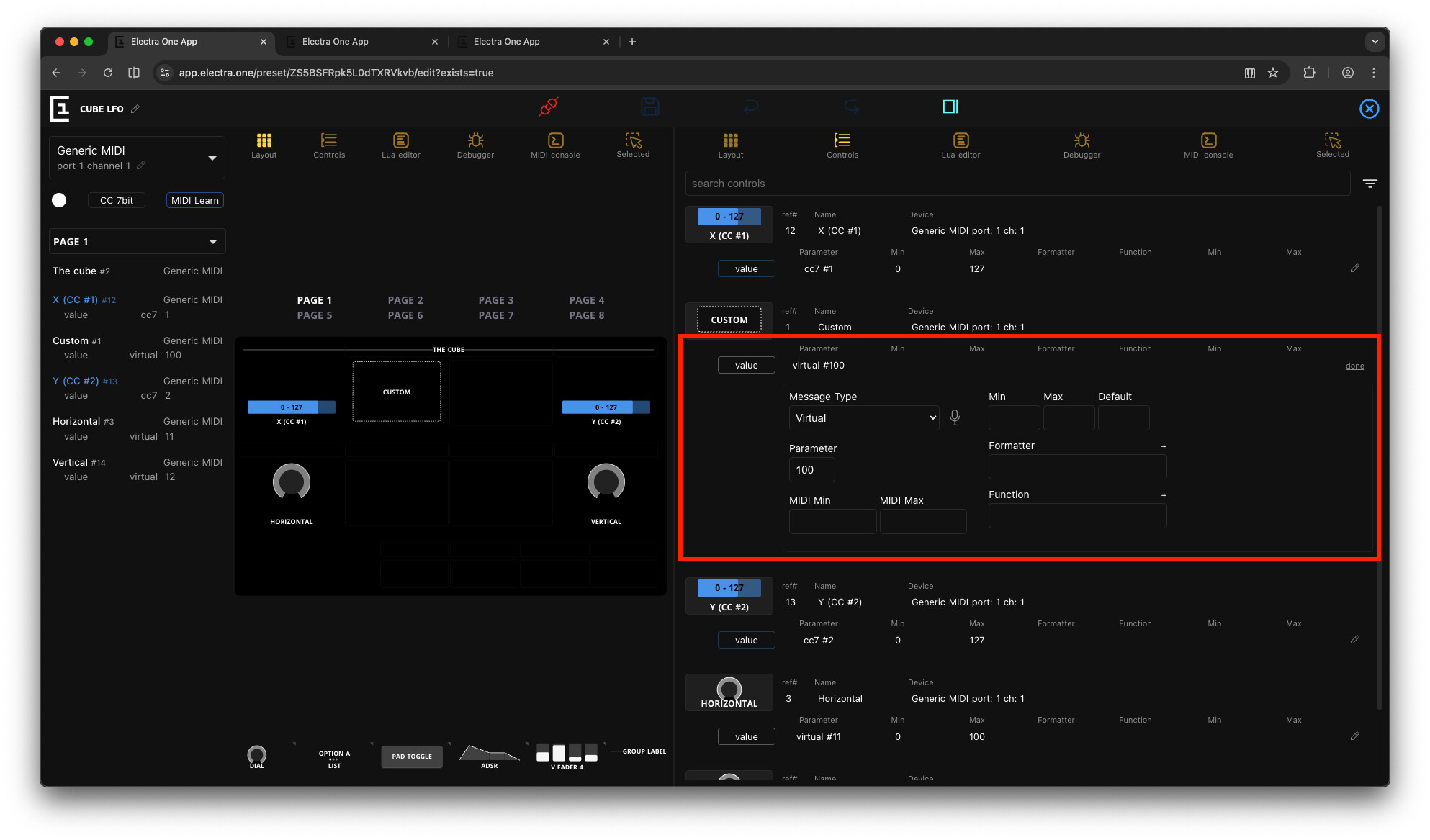
The list of controls with a built-in editor for alternative way of editing and better overview:
A monospaced font, manual control of the auto-scroll, no-irritating hiding search bar, and a built-in completion for E1 Electra Lua API commands and functions:
A possibility to open the inspector of selected object in the editor view, thus more room to view things:
There are many more changes and numerous bug fixes based on what was reported. There is, still, quite a list of things to do. We continue working on it.
And of course, the new editor supports Electra One mini presets 
Really like the changes! The left side list makes it much easier for me to keep track of the CC # mappings. One thing I have noticed is that when on the layout page and opening an item from the left side list, I can close it again (go back to list) by clicking in a blank space on the page. But on the controller page that doesn’t seem possible. The only way to close the left side item detail is to go back to the layout page and click. Is that correct, desirable? Thanks.
I see. The selected panel can be closed by hitting Esc key as well. But that has not been added to the control list page either. I will make sure it works identical to the layout page.
Loving the new changes, the split screen is just awesome for workflow, thank you!  Only one query, I can’t see any access to the JSON? Will this be added in the future? Thanks.
I have temporarily removed the preset JSON view. The reason is that it was causing quite some confusion. The issue here is that the preset JSON is a JSON file exported by the editor and optimized to run in the hardware controller. The editor internally uses so-called project JSON. That means that any edit made to the preset JSON in the editor would result in conversion back to the project JSON and then to the preset JSON again so that it could be shown in the editor. That would not fly. The importance of the project JSON is even higher now. We will be introducing support for multiple layouts in one project. So, what is going to happen (most likely) is providing a documentation of the Project JSON and adding an editor for that.
Ah, I get you, thank you for the insight. TBH I didn’t edit the JSON very often, I just used it as a reference point to help me understand why things in my presets didn’t always work out as expected! The idea of a dedicated editor and documentation sounds great though, knowledge is power!
Thanks, J.
I’m using the editor with my Mini and found some issues:
It looks like it’s not possible to delete a single control. The only way I found to do that is by selecting more than one control and go to the “Selected” menu.
Copy/pasting single controls isn’t possible either.
The LUA editor within the split view doesn’t react to size changes of the split. Auto-scroll in the LUA editor console is broken too.
Changing the variant of a dial will change it to the bar display without a way to get the dial display back.
HI @Martin. I’m getting the message that my E-1 isn’t connected, but only on the Preset Editor Screen. The controller screen tells me the E-1 is connected. I have done a hard reset - I did a full cache delete and reboot too.
I logged a bug before I saw this post.
you can use delete/backspace to remove single control and CMD (CTRL) + C/V to copy. But it was pointed out recently that there should be visual icon or button for that in the UI. I will do that.
What OS and browser are you using?
I am looking at it now. I might reach you on the PM if I am unable to replicate that.
HI @martin , trying the new web editor out, some great UX improvements
Found a few minor issues (Chrome Version 144.0.7559.59 (Official Build) (arm64), MacOS Tahoe 26.2):
Log autoscroll is not working (e.g. set log level to Trace or Info). If it auto-scrolls at all, it only seems to scroll up one line, even though there may be many other log lines below.
The Log Level resets to “Critical” every time you change to another view then back again to the Lua Editor or Debugger views. E.g. change level to INFO, then change to, say Patch, then back to Lua editor .. you will see level is back to CRITICAL again.
The caret cursor on the Lua editor panel appears to be much larger than it should be, which makes accurate selection difficult. Digging into the css a bit, looks like it’s an issue with the monaco editor hc-black theme css .. if I disable that css rule in the Chrome dev tools, the cursor is shown with the correct size (same size as text)
I think this is a minor bug with the new editor. In the old editor, all or at least some of the icons at the top of the main pane had mouse-hover tooltips. Now the only one that does is Leave Editor.

None of the others have tooltips. The screenshot below shows me trying to show Send to Electra’s tooltip. I’m fairly sure it used to have one.

I also would expect the other icons, including the new Split icon, to have tooltips.
Another possible bug. Subsequent to the release of the new editor, I can no longer delete a preset from a slot. This was working fine two days ago, when I last used the old editor. So I’m posting it here, rather than creating a new Bug topic.
Step to Reproduce
Click the Rubbish Bin icon to the right of the name of the preset in the slot.
Expected Result
Normally, the preset would normally be deleted immediately, with the slot shown as unused on the web page. The exception was if the website has somehow become disconnected from the Electra One. Then progress dots would then be shown forever to the left of the slot number.
Actual Result
If I click the Rubbish Bin icon nothing happens. The preset does not get removed from the E1. And there’s no visual feedback on the website.
I’ve occasionally needed to look at the JSON. As that was usually to search for something, I downloaded the project and opened it in a text editor. I thought it was impossible to edit the JSON. Did there use to be a way of doing that?
I am working on an updated version, trying to reflect stuff reported/suggest here, as well as in other threads (@klaustrophil, @HaPe)
an updated version of the web editor has been released. Variants of faders can be changed back to dial (@hape), projects can be cloned (@klaustrophil), auto-scroll and log level should be persistent (across tab changes) - @Phommed. I am unable to replicate the issue with auto scroll not working - but I tried to make a few adjustments. Tool tips added (@SimonORorke ). I will continue working on it later today.
Hi @martin Thanks for the update, log level does now persist across tab changes, and the log is now autoscrolling.
I noticed that the “large caret cursor” issue I reported above is still happening, but only seems to happen if the browser (Chrome) zoom level is set to 100% or higher. If I set it to anything less than 100% (e.g. 90%, so the web editor text appears smaller), the caret cursor switches to the same size as the editor text and selection behaviour works as expected. Looking into the editor “computed” css again, I can see that:
url(data:image/png;base64,iVBORw0KGgoAAAANSUhEUgAAACAAAAAgCAQAAADZc7J/AAAAz0lEQVRIx2NgYGBY/R8I/vx5eelX3n82IJ9FxGf6tksvf/8FiTMQAcAGQMDvSwu09abffY8QYSAScNk45G198eX//yev73/4///701eh//kZSARckrNBRvz//+8+6ZohwCzjGNjdgQxkAg7B9WADeBjIBqtJCbhRA0YNoIkBSNmaPEMoNmA0FkYNoFKhapJ6FGyAH3nauaSmPfwI0v/3OukVi0CIZ+F25KrtYcx/CTIy0e+rC7R1Z4KMICVTQQ14feVXIbR695u14+Ir4gwAAD49E54wc1kWAAAAAElFTkSuQmCC) 5 8,text-webkit-image-set(url(data:image/png;base64,iVBORw0KGgoAAAANSUhEUgAAABAAAAAQCAQAAAC1+jfqAAAAL0lEQVQoz2NgCD3x//9/BhBYBWdhgFVAiVW4JBFKGIa4AqD0//9D3pt4I4tAdAMAHTQ/j5Zom30AAAAASUVORK5CYII=) 1x,url(data:image/png;base64,iVBORw0KGgoAAAANSUhEUgAAACAAAAAgCAQAAADZc7J/AAAAz0lEQVRIx2NgYGBY/R8I/vx5eelX3n82IJ9FxGf6tksvf/8FiTMQAcAGQMDvSwu09abffY8QYSAScNk45G198eX//yev73/4///701eh//kZSARckrNBRvz//+8+6ZohwCzjGNjdgQxkAg7B9WADeBjIBqtJCbhRA0YNoIkBSNmaPEMoNmA0FkYNoFKhapJ6FGyAH3nauaSmPfwI0v/3OukVi0CIZ+F25KrtYcx/CTIy0e+rC7R1Z4KMICVTQQ14feVXIbR695u14+Ir4gwAAD49E54wc1kWAAAAAElFTkSuQmCC) 2x) 5 8,textNot sure you have much control over this, but at least there seems to be a workround .. set browser zoom to 90% or less.
I was not able to replicate that yet. my cursor looks ok. I will try to mess around with the zoomin.