What does that mean, does Electra lose midi bytes?
I tested a much shorter (40 bytes) midi sysex message and then I didn’t get any error.
UPDATE:
I asked ChatGPT. If you have a large SysEx message (for example, hundreds of bytes), your for loop will print a huge amount of text.
Some environments (such as REAPER ReaScript, MIDI monitors, or embedded Lua) may truncate or corrupt the log output when there’s too much printed data.
Is this the correct answer Martin?
I have seen that it calculates correctly when it comes to the length of the sysex message so maybe this is not a problem…
A sysEx message of a few hundred bytes is nothing special…
Do check there is no MIDI clock running, incoming in the E1. There was an issue with the first version V4 beta release that the MIDI clock got intercepted as part of the sysEx leading to strange results.
Not sure that’s the reason but better first exclude it , I’d say.
I have a similar problem using lua midi.onSysex, but in my case the sysex message is always corrupted from byte 49 onwards regardless of the sysex message type. For sysex messages that I know are longer than 50 bytes (usually ~250 bytes), the length of the sysex block is also wrongly reported as 50 when I use sysexBlock:getLength. So instead of getting the full block, it gets 50 bytes of which the first 48 are correct, and then I get several other shorter nonsense messages. I’ve checked the sysex data block in MidiOx and it looks fine. There are no bytes greater than 7F that might break reading the sysex block. Any suggestions what could cause this? I have the synth’s MIDI clock turned off and the electra firmware is 4.1.1.
p.s. The problem persists if I use midi.onMessage rather than onSysex.
I have a similar problem using lua midi.onSysex, but in my case the sysex message is always corrupted from byte 49 onwards regardless of the sysex message type. For sysex messages that I know are longer than 50 bytes (usually ~250 bytes), the length of the sysex block is also wrongly reported as 50 when I use sysexBlock:getLength. So instead of getting the full block, it gets 50 bytes of which the first 48 are correct, and then I get several other shorter nonsense messages. I’ve checked the sysex data block in MidiOx and it looks fine. There are no bytes greater than 7F that might break reading the sysex block. Any suggestions what could cause this? I have the synth’s MIDI clock turned off and the electra firmware is 4.1.1.
p.s. The problem persists if I use midi.onMessage rather than onSysex.
Later: This problem arose when I had the synth connected to the electra mk II USB host port. If I connect them using a pair of DIN cables it works as it should. So maybe there’s a response/latency problem with the host port for longer messages? The synth is a Teensy 4.1 based device.
teensy arrived. If you were able to make a firmware for it that I could use to replicate the problem, it would really save my time. Let me know. Thanks.
Hi Martin, sorry about the late reply, I didn’t see your message until today. I’ve created a small ino file (txt file attached) that waits for a Midi note-on event and then sends out from the T4.1 USB port a sysex block of 400 bytes containing 4 repeats of the values 0-100. If I connect the T4.1 to MIDI OX to trigger and look at the sysex output it all works just fine.
But when I connect the T4.1 to the electra host port, and use a button to send a note-on event, I can’t get the online lua editor to show any sysex response from the Teensy at all. There’s a led on the T4.1 to show that the sysex has been sent, and that lights up correctly. I’ve included the T4.1 ino src code and simplistic lua script I’m using in the attached txt file, as well as the compiled hex file for your t4.1.
If I hook up the T4.1 based synth that I tested a few weeks ago, and press a manual sysex dump from it, there is a response from the same lua script, but it gets corrupted after ~50 bytes as I mentioned previously.
In either case the host port sysex on my electra seems to not be behaving. Can you please let me know if you get the same result in case I have a hardware problem. Thanks.
Actually, I recall now that I asked another electra user who also has the same T4.1 based synth as I’m referring to here, and he saw the same corrupted data when reading sysex into the electra host port (and printing the data via lua). So it’s not a hardware issue specific to my electra unit.
I quite sure it is not a hardware thing. The USB protocol and the USB MIDI are quite complex, it is very unlikely that it would be caused by the hardware on a particular device. A hardware issue would most likely result in completely broken communication…
I will flash your firmware to my teensy and will use it to trace the communication / firmware with the hardware debugger. If the issue is reproducible as you describe it should be fairly easy to identify it.
I am currently almost fully occupied with finishing works on the E1 mini, but I will look at that as soon as I can. Both, OG E1 and E1 Mini share the same firmware.
@rvh@joris.roling Electra One requests 64 bytes USB packets but Teensy sends 512 bytes back. Since E1’s transfer buffers are sized to handle 64 bytes max, the data gets trimmed - resulting at around 50 “user” bytes successfully processed.
Teensy announces that it has max packet size of 512 bytes. So I can adjust everything based on that information. I think, however, when the hosts (E1) asks for smaller packets to be used, that request should be followed by the connected USB device…
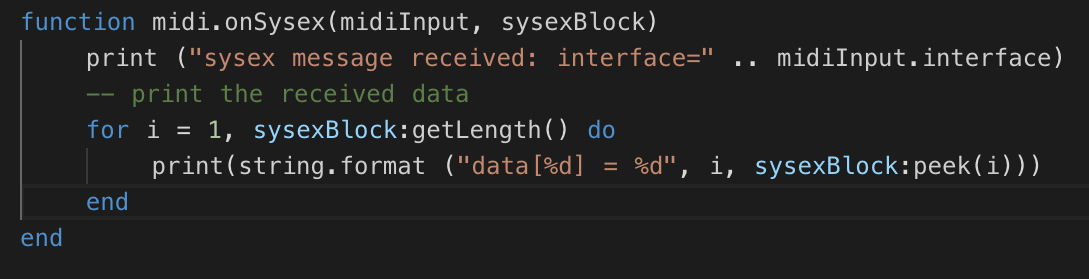
Anyways, I am able to resolve in our firmware. @rvh I can successfully transfer those 400+2 bytes from your Teensy firmware:
Thanks very much Martin. I will look forward to the new firmware as soon as it’s available so I can implement full bidirectional USB / sysEx communication between the Teensy and E1.
My understanding is that at full speed (12MB) the default USB packet size on Teensy is 64 bytes, and at high speed it is 512 bytes. But I am very surprised to hear you say that the Teensy is not setting the high speed packet size to 64 when requested. My suggestion is for you to ask about this on the PJRC forum forum.pjrc.com They should be able to help you find out what’s going on there.
I love it you gave this issue some attention. Cheers!
But I still get no SysEx back from my Teensy. What can I do to properly monitor that? Is there a preset I can use to see the LUA output there? I did enter the stuff I see in your screenshot, and it compile allright, but nothing… (I feel I’m a LUA noob)
Edit: I see (read) now that the LUA goes together with a Teensy INO, my bad (sorry). My question on how I could monitor still stands…
Should I try shorter SysEx messages? But even my very short Ping/Pong messages do not come through though.
Cheers,
Joris
PS1 You did not mention in your Changes to v4.3.1 that you gave the rotatary dial a nummerical feedback. Love it!
PS2 I tried to create a momemtery pad sending out a fixed SysEx, but I see a lot of ‘crap’ (as in invalid MIDI messages in my MIDI monitor), coming from Electra One. Could you have a look? The preset is very simple (still) and you can find it here: preset
PS3 This behaviour (bad MIDI) went away after a power rest. And I do see some activity on the USB Host port (good! Probably MIDI Clock from the Teensy), but still nothing from the Teensy gets forwarded to USB Device (what I would expect), and see in MIDI Monitor.
PS4 Using the Preset Demo, I’m able to send a MIDI Start message to the teensy, and it picks this up, and starts playing notes (on its internal sync), I know, because I have the Teensy blinking when notes are on. What strikes me, is that the USB Host label at the top (showing the Teensy name), does blink when a MIDI Start or MIDI Stop is sent over it, but it does NOT blink on the incomming notes, which might explain why I don’t see any MIDI coming in via USB Device in my laptop.

 I keep looking at it.
